UX & Design

Enterprise Tech

Prototype

BDO Digital

ITsavvy.
Search-driven redesign.

Shifting from dense navigation to a streamlined, search-led experience.

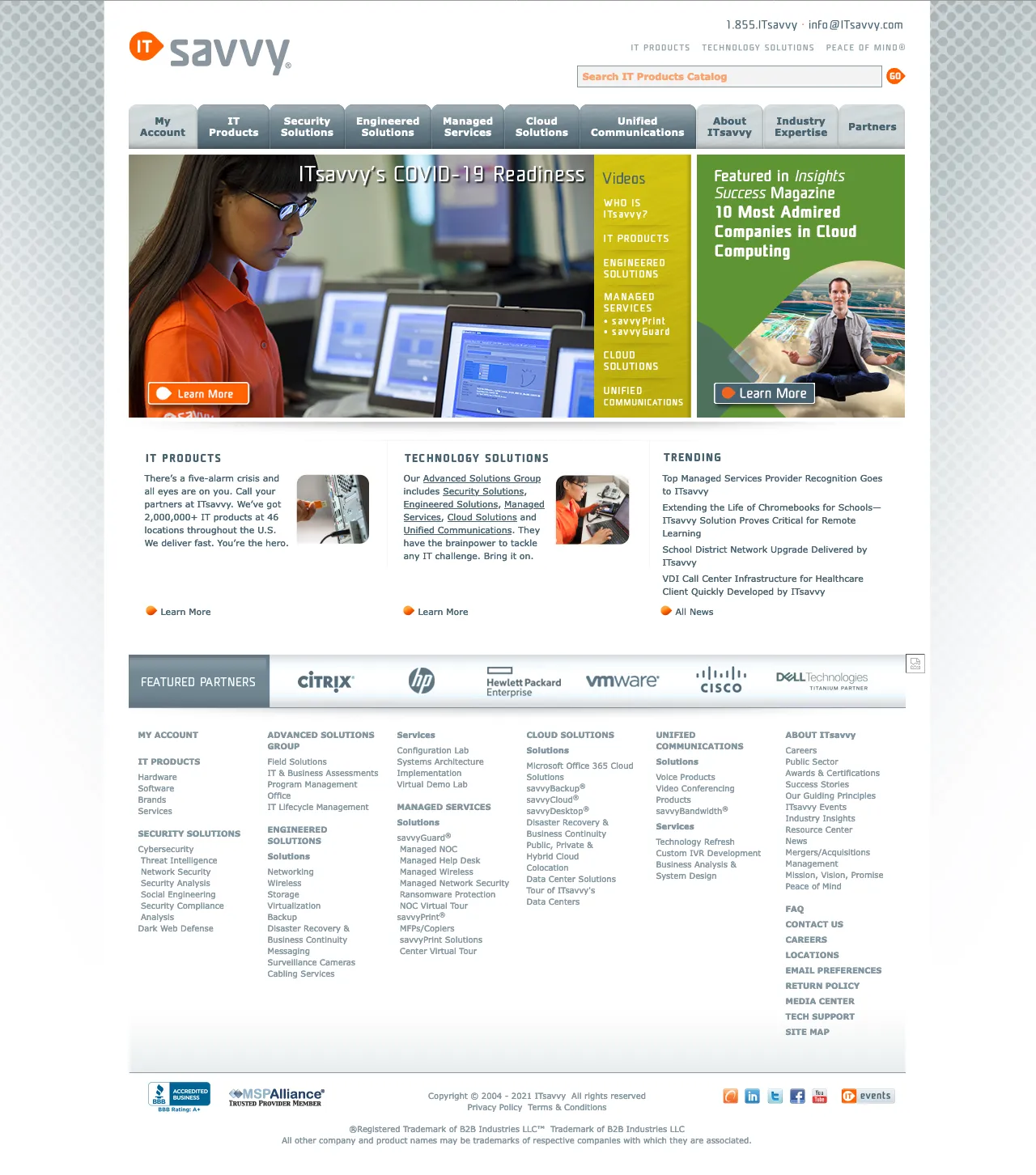
ITsavvy’s platform served a broad catalog of technology products and services — but finding anything required navigating layered menus and reading through dense, text-heavy pages. The structure reflected how the business was organized, not how users actually looked for what they needed.

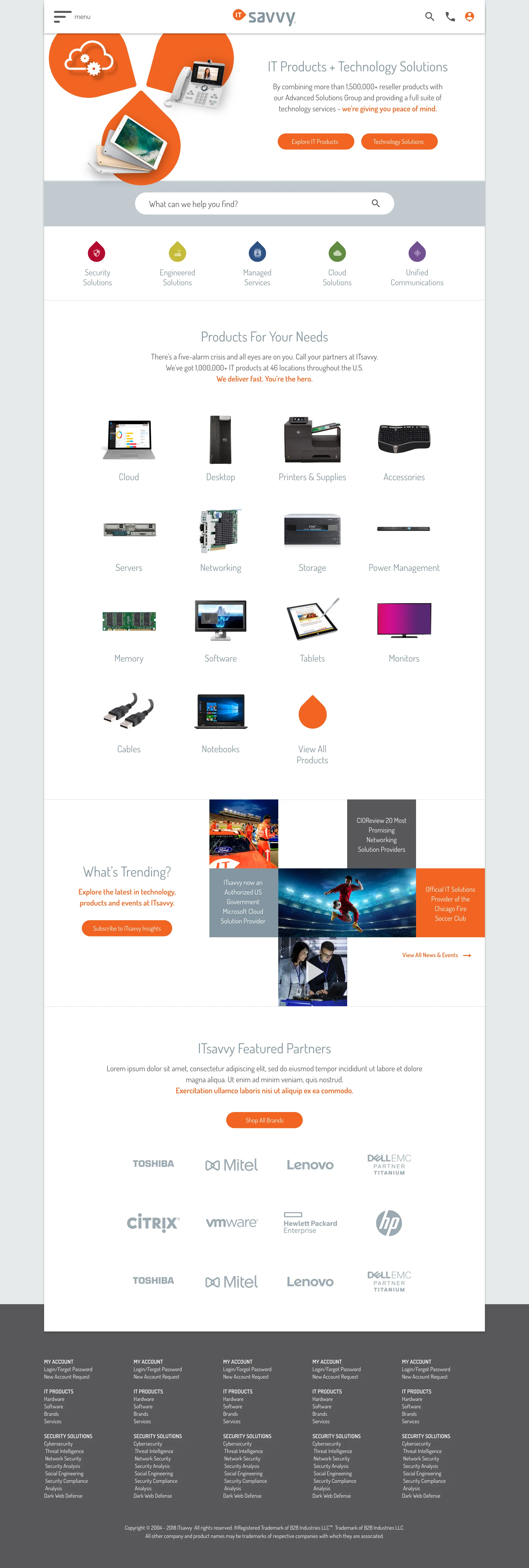
The prototype reimagined the experience around search as the primary entry point — supported by visual browsing, simplified navigation, and cleaner page hierarchy — to make the platform faster and more intuitive to use.

  • Simplified complex service structure into a clearer experience

  • Shifted from navigation-heavy to search-driven discovery

  • Introduced visual browsing to support faster decision-making

  • Reduced reliance on dense, text-heavy content

  • Integrated Oracle search to drive exploration and results

Search first

Oracle search as the primary entry point — not a secondary tool

Nav ↓

Layers of menu navigation reduced to direct paths and visual entry points

Prototype

Full concept prototype built for stakeholder validation

Visual ↑

Text-heavy pages replaced with visual scanning and image-led browsing

The Challenge

Built for the business,
not the user.

ITsavvy’s site structure mirrored its internal service organization — which made sense internally but created real friction for users trying to find products and services quickly. The deeper you went, the more text you had to read, and the harder it was to compare or decide.

The brief was to prototype a fundamentally different approach — one that put Oracle search at the center and replaced navigational complexity with visual clarity.

Key problem areas

Layered navigation

Multiple levels of menu navigation required before reaching relevant content — high effort for users who already knew what they wanted.

Text-heavy pages

Service and product pages led with dense copy rather than visual signals — slowing scanning and increasing cognitive load.

Search underutilized

Oracle’s search capability existed but wasn’t the primary discovery path — users were directed into navigation instead.

Architecture

Flattening the structure

The existing navigation hierarchy buried content behind multiple decision points. The redesigned architecture reduced layers, positioned search as the primary route, and used visual browsing as the secondary path for exploration.

figma — ITsavvy-IA-restructure-v2 — navigation before / after
Before — layered, nav-heavy
Primary Navigation
Products 4 levels deep
Services 3 levels deep
Solutions
Industries
Resources dense text
About
Search secondary
After — search-first, visual browsing
Primary experience
Oracle Search primary
Intent-driven results
Visual product browsing
Products visual grid
Services simplified
Solutions
About
Key decision: Oracle search was introduced and implemented as part of the POC — a new capability brought in specifically to enable intent-led discovery. Navigation retained for browsing, but users no longer needed to navigate to find what they were looking for.

Before – layered navigation, text-heavy pages, search buried

after – search-led homepage, visual category browsing, simplified paths

UX & Flow

From navigation to intent

The fundamental shift was from navigation-led to intent-led. Instead of asking users to understand the site’s structure, the new experience met users where they were — search surfacing results immediately, visual browsing for those who wanted to explore.

figma — ITsavvy-search-flow-v3 — discovery before / after
Before — navigation-led
Homepage
Top nav menu
User must understand site structure first
Level 1
Level 2
Level 3
3–4 clicks before reaching relevant content
Text-heavy page
Read to decide
Dense copy required to evaluate options
After — search & intent-led
Homepage
Intent captured immediately — no nav required
Visual results
Product / service
Results shown visually — scan, not read
Browse path
Visual category grid
Visual browsing as alternative for explorers
The shift: Oracle search was introduced as part of the POC — not something that already existed. The shift: from asking users to navigate before they could discover, to meeting them with search at the front door. Visual browsing as the fallback for explorers.

design thinking

Decisions that shaped the prototype

01

Search as the front door

Oracle’s search capability was already present but buried. Moving it to the primary position on the homepage changed the entire interaction model without requiring a complete rebuild of the underlying content.

02

Visual over text

Product and service pages led with imagery and visual scanning patterns rather than paragraphs of copy. Users making technology purchasing decisions need to orient quickly — visual hierarchy does that faster than text blocks.

03

Fewer navigation levels

The multi-level dropdown structure was simplified to reflect how users actually categorize technology needs — not how the business organized its service lines. Fewer decisions before reaching content.

04

Homepage as an entry point, not a directory

The original homepage functioned as a table of contents. The redesigned homepage was built around a single question — what are you looking for? — with search and visual browsing tiles as the answer.

outcomes

What the prototype validated

Search-first interaction model

Oracle search re-positioned from a secondary utility to the primary discovery path — validating that intent-led navigation was viable for ITsavvy’s catalog.

Visual browsing established

Image-led category browsing replaced text-heavy pages — showing that ITsavvy’s products could be presented visually without losing technical depth.

Clear development direction

The prototype gave stakeholders a concrete product vision — aligning expectations and providing a design foundation for the engineering team to build from.

Figma

Prototyping

UX Strategy

Information Architecture

UI Design

Oracle Search

Search UX

Enterprise Platform